What is Airtel SmartConnect 5G Home & Office WiFi?
Fixed Wireless Access (FWA) system providing reliable, high-speed internet for homes and offices in Kenya
What is Airtel SmartConnect?
Airtel SmartConnect 5G Home & Office WiFi is a wireless internet solution that brings high-speed internet to your home or office without needing cables like fiber or DSL. Think of it as a bridge between Airtel's cellular network and your devices - it receives internet signal wirelessly from Airtel's cell towers and creates a WiFi network in your home or office.
This is perfect for areas where traditional cable internet (like fiber optic cables) is difficult or impossible to install - such as rural areas, remote locations, or places where digging cables isn't practical. Instead of waiting for cable infrastructure, you get internet through Airtel's existing cellular network.
The system consists of two components that work together:
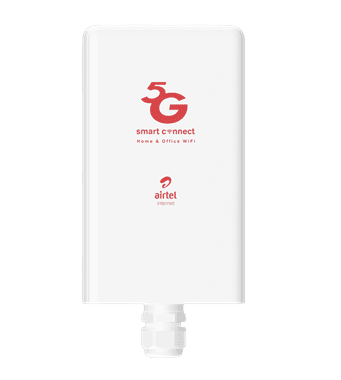
Outdoor Unit (ODU)
Model: ZLT X17M
A weather-resistant 5G modem with integrated directional antennas that connects to Airtel's cellular network. Installed outside for optimal signal reception. Learn about LED indicators
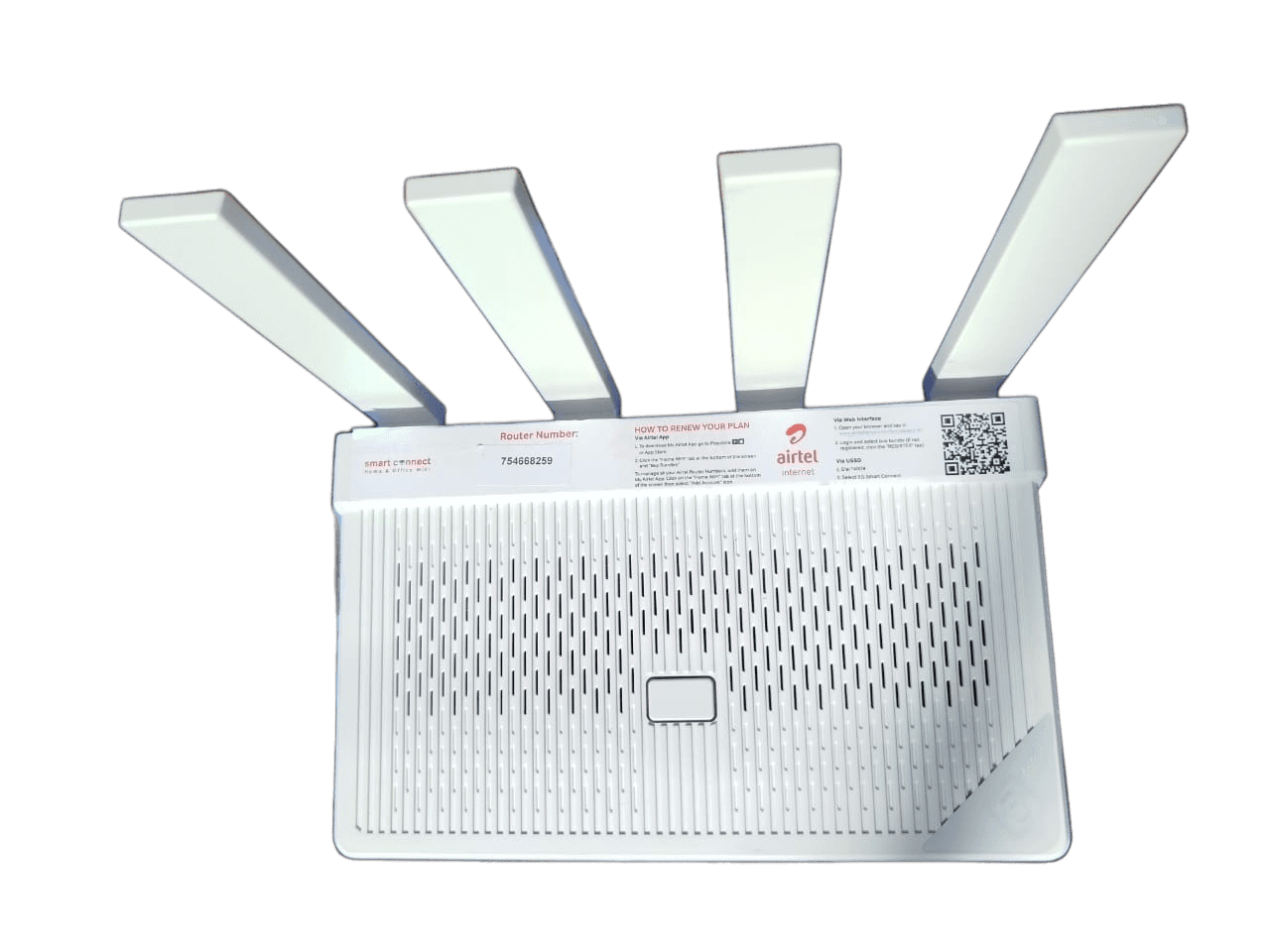
Indoor Unit (IDU)
Model: ZLT W304VA PRO
A WiFi 6 router that creates your local network. Connects to the outdoor unit via Ethernet cable and distributes internet to all your devices. Access router settings
Important: This is not a signal booster or amplifier. It is a complete internet access solution that works independently, providing internet where cable-based services are unavailable.
Problem It Solves
The Challenge
In Kenya, both urban and rural users face the challenge of accessing reliable, affordable internet. Cable-based internet (fiber or DSL) is often difficult or impossible to deploy in many areas, especially in rural locations.
Without a solution like Airtel SmartConnect, users are forced to rely on mobile data, which becomes expensive for continuous or heavy internet use.
The Solution
Airtel SmartConnect provides wireless internet access that doesn't require cable installation. It's perfect for areas where traditional internet infrastructure is unavailable, offering a cost-effective alternative to expensive mobile data plans.
Key Features & Benefits
5G/4G Connectivity
Connects to Airtel's 5G network with automatic fallback to 4G and 3G when 5G is unavailable. Uses bands including n41 (5G) and B1, B3, B20 (4G).
1 TB Data Cap
Generous 1TB monthly data allowance. After reaching the cap, continue browsing at 2 Mbps. Purchase additional bundles to restore full speeds.
WiFi 6 Technology
Indoor router supports WiFi 6 (802.11ax) standard, providing faster speeds, better performance with multiple devices, and improved efficiency. Find WiFi password
Weather Resistant
Outdoor unit operates from -30°C to +60°C, making it suitable for Kenya's climate. Weather-resistant design ensures reliable operation in all conditions.
Portable
Unlike cable-based internet, you can move Airtel SmartConnect to another location (within Airtel coverage). Perfect for renters or those who relocate.
POE Power
Outdoor unit receives power through the Ethernet cable (Power over Ethernet), simplifying installation and reducing cable clutter.
Rechargeable Battery
Device includes a rechargeable battery for backup power. Battery requires recharging when depleted.
NFC OneHop
Quick WiFi connection using NFC-enabled Android devices. Tap the NFC area on the router to connect without entering passwords. NFC setup guide
Easy Management
Manage your router via web interface (192.168.1.1) or TZLink mobile app. Simple setup and configuration for non-technical users. Setup guide
Technical Specifications
Outdoor Unit (ZLT X17M)
- • Operating Temperature: -30°C to +60°C
- • Relative Humidity: 5% to 95%
- • Dimensions: 195mm × 110mm × 42mm
- • Weight: Approximately 600g
- • Network: 5G NSA, 4G LTE, 3G fallback
- • Power: POE (Power over Ethernet) - Learn about ports
- • Antenna: Integrated directional antennas - LED guide
Indoor Unit (ZLT W304VA PRO)
- • Working Temperature: 0°C to +40°C
- • Relative Humidity: 5% to 95%
- • Power Supply: AC 100V-240V, 50Hz-60Hz
- • Output: DC 12V/2A
- • Dimensions: 230mm × 140mm × 150mm
- • Weight: 470g
- • WiFi: WiFi 6 (802.11ax) - WiFi password guide
- • Ports: WAN (POE), 3× LAN, USB - Port details
Network Bands (Observed)
- • Band 1 (2100 MHz)
- • Band 3 (1800 MHz)
- • Band 20 (800 MHz)
- • n41 (~2.5 GHz)
Note: Band availability depends on Airtel network deployment in your area. The device automatically selects the best available band.
How It Works
Installation Process
- 1Professional Installation: A properly trained Airtel installer performs the first installation. The outdoor unit is mounted outside (rooftop, wall, or pole) for optimal signal reception.
- 2Connection: The outdoor and indoor units are connected via Ethernet cable (CAT5E or CAT6) with waterproof protection. The cable provides both data and power (POE) to the outdoor unit.
- 3SIM Card: An Airtel 5G SIM card is inserted into the outdoor unit's SIM slot (located at the bottom, requires opening screws). See SIM installation guide
- 4Power On: The indoor router is connected to power. The system boots automatically and connects to Airtel's network.
- 5Ready to Use: Once installed, the device operates as plug-and-play. Connect your devices to the WiFi network using the default password (found on the router label). Find default password
Operation
Once installed, Airtel SmartConnect works automatically:
- • The outdoor unit connects to Airtel's 5G network (or 4G/3G if 5G unavailable)
- • Signal is transmitted to the indoor router via Ethernet cable
- • The indoor router creates a WiFi 6 network for your devices
- • All your devices (phones, laptops, smart TVs, etc.) connect to the WiFi
- • No ongoing maintenance required - it's "set it and forget it"
Who Is This For?
Home Users
- • Netflix streaming and video entertainment
- • Online gaming
- • General browsing and social media
- • Work from home
- • Video calls and conferencing
- • Smart home devices
Business & Office
- • Office internet connectivity
- • Video conferencing and remote meetings
- • Cloud services and file sharing
- • Point of Sale (POS) systems
- • Email and business applications
- • Multiple device connectivity
Ideal For:
- ✅ Areas without cable internet infrastructure
- ✅ Rural locations
- ✅ Urban areas with weak signal
- ✅ Renters who need portable internet
- ✅ Users seeking cost-effective internet
- ✅ Those who want to avoid expensive mobile data
- ✅ Homes and offices needing reliable connectivity
- ✅ Users who want flexibility (no long-term contract)
Key Benefits
💰 Cost Savings
Save on data costs compared to mobile data plans. With 1TB monthly allowance, you can browse frequently without constantly worrying about running out of data or expensive overage charges.
🆓 Freedom to Browse
Browse the internet whenever and as much as you want without worrying about data usage or expiry. Enjoy streaming, gaming, and working online without restrictions.
📦 Portability
Unlike cable-based internet, you can move Airtel SmartConnect to another location (within Airtel coverage). Perfect for renters, temporary locations, or if you relocate.
🔓 No Long-Term Contract
No contract required. Add extra data bundles and change plans when needed. Complete flexibility to adjust your service based on your needs.
Requirements & Compatibility
Network Requirements
- • Network Lock: Device is locked to Airtel network only
- • Coverage: Requires Airtel network coverage in your area - Signal troubleshooting
- • Fallback: Automatically falls back to 4G and 3G when 5G is unavailable
- • Availability: Currently available in selected areas with adequate Airtel coverage
Installation Requirements
- • Location: Outdoor unit must be installed outside for better and more stable connectivity
- • Height: Works best when installed at higher points (rooftop, upper floor)
- • Safety: Proper safety precautions should be observed during installation
- • Professional Installation: First installation is carried out by a properly trained Airtel installer
- • Power: Requires standard AC power outlet for indoor unit
⚠️ Important: Service availability and performance depend on Airtel network coverage in your area. Not suitable for areas experiencing heavy or persistent Airtel network issues. Check availability before ordering.
Airtel 5G Router Price & Costs in Kenya
Find out the complete Airtel 5G router price, installation cost, and monthly data package prices. The Airtel SmartConnect device is provided free - you only pay for installation and your chosen data plan.
Device & Installation Cost
- • Airtel 5G Router Device: Free (provided at no cost)
- • Installation Cost: 1,000 KES (one-time fee)
- • SIM Card: Included with device (no extra cost)
- • Professional Setup: Included in installation fee
Monthly Data Package Prices
- • 15Mbps Plan Price: 1,999 KES/month
- • 30Mbps Plan Price: 2,999 KES/month
- • Data Cap: 1TB per month included
- • After Cap: 2 Mbps unlimited (no extra charges)
Total Airtel 5G Router Cost Breakdown: The Airtel SmartConnect 5G router device is completely free. You only pay 1,000 KES for professional installation (one-time fee) plus your chosen monthly data package (1,999 KES for 15Mbps or 2,999 KES for 30Mbps). No long-term contracts required - you can change plans or add extra data bundles as needed.
Best Value: Compared to expensive mobile data plans, Airtel 5G router offers cost-effective internet with 1TB monthly data allowance. Perfect for homes and offices in Kenya looking for affordable high-speed internet.
Data & Plans
Data Cap: 1 TB (1,000 GB)
Each month, you receive 1TB of high-speed data. This generous allowance is perfect for:
- • Streaming hundreds of hours of video
- • Online gaming
- • Working from home
- • Multiple devices connected simultaneously
- • Heavy internet usage without worry
After Data Cap
Once you reach the 1TB data cap:
- • Speed Reduction: Automatically reduced to 2 Mbps
- • Continued Access: You can still browse, but at slower speeds
- • Additional Bundles: Purchase extra data bundles to restore higher speeds
- • Flexibility: Add data as needed, no contract restrictions
Frequently Asked Questions
Does Airtel SmartConnect use a SIM card?
Yes, Airtel SmartConnect requires an Airtel 5G SIM card to work. The SIM card is inserted into the outdoor unit (the antenna that's installed outside).
SIM card included: When you order Airtel SmartConnect, the SIM card comes with the device and is already activated with your chosen data plan. You don't need to purchase a separate SIM card or worry about getting one - it's all included.
Professional installation: During your first installation, the professional Airtel installer will insert the SIM card into the outdoor unit for you. The SIM card slot is located at the bottom of the outdoor unit, and the installer knows exactly how to access it and install it correctly. You don't need to do anything - the installer handles the entire setup, including SIM card installation. See SIM installation guide
How it works: Just like your phone needs a SIM card to connect to the network, the outdoor unit uses the Airtel SIM card to receive internet signal from Airtel's cell towers. The SIM card must have an active Airtel data plan, which is already set up when you order the service. If you experience SIM card issues, see our SIM card troubleshooting guide.
How many devices can connect to Airtel SmartConnect?
Airtel SmartConnect can support up to 64 devices simultaneously. However, for optimal performance, we recommend connecting up to 32 devices at a time.
What you can connect: You can connect all your devices to the WiFi network created by the indoor router - smartphones, laptops, tablets, smart TVs, gaming consoles, smart home devices, and more. Each device connects wirelessly to the router, just like connecting to any WiFi network.
Why 32 is recommended: While the router can technically handle 64 devices, connecting 32 or fewer devices ensures better performance for each device. When more devices share the connection, the available internet speed is divided among them. For example, if many devices are streaming videos or downloading files simultaneously, each device will get a smaller portion of the total speed. Keeping it to 32 devices or fewer ensures everyone gets good speeds.
Wired connections: The indoor router also has 3 LAN ports for wired connections. Wired connections (using Ethernet cables) are typically faster and more stable than WiFi, so you can connect computers, gaming consoles, or smart TVs directly via cable for the best performance. Learn about router ports
Performance tip: If you experience slow speeds with many devices connected, see our slow internet troubleshooting guide for solutions.
Is Airtel SmartConnect a signal booster?
No, Airtel SmartConnect is not a signal booster or amplifier. It's a complete internet access solution that works independently.
The difference: A signal booster takes an existing weak signal and makes it stronger. Airtel SmartConnect is different - it's a complete system that connects directly to Airtel's cellular network (like your phone does) and creates a WiFi network in your home or office. It doesn't need an existing internet connection to work.
How it works: The outdoor unit connects to Airtel's 5G/4G network using a SIM card, receives internet signal from cell towers, and sends it to the indoor router. The indoor router then creates a WiFi network for all your devices. It's a standalone internet solution, perfect for areas where cable internet isn't available. Check the LED indicators guide to understand device status.
Can I use Airtel SmartConnect with my existing router?
Airtel SmartConnect is a complete, standalone router system - it works on its own and doesn't need another router. However, if you want to use it alongside an existing router, you can.
How to connect: You can connect Airtel SmartConnect to your existing router using an Ethernet cable. Plug one end into one of the LAN ports on the Airtel SmartConnect indoor router, and the other end into your existing router. This allows you to expand your network or use both routers together. See router ports guide
Most common use: Most people use Airtel SmartConnect as their main router, replacing or supplementing their existing internet connection. You don't need another router - Airtel SmartConnect creates its own WiFi network that all your devices can connect to. If you have WiFi connection issues, see our WiFi troubleshooting guide.
What happens when I use all 1TB of data?
Each month, you get 1TB (1,000 GB) of high-speed data. That's a lot - enough for hundreds of hours of video streaming, online gaming, working from home, and more.
After reaching 1TB: Once you've used all 1TB for the month, your internet speed automatically slows down to 2 Mbps. This happens automatically - you don't need to do anything. At 2 Mbps, you can still browse websites, check email, and use social media, but video streaming and large downloads will be slower.
Getting faster speeds again: If you need faster speeds before the next month starts, you can purchase additional data bundles. Once you buy extra data, your speeds return to normal immediately. You're not cut off from the internet - it just runs at a slower speed until you add more data or the new month begins.
Monthly reset: Your 1TB allowance resets at the start of each new month, so you get a fresh 1TB to use again.
Can I move Airtel SmartConnect to a different location?
Yes! Airtel SmartConnect is portable, which is one of its big advantages over cable-based internet.
Moving to a new location: Unlike fiber or DSL internet that's tied to a specific address, you can uninstall Airtel SmartConnect and take it with you when you move. This makes it perfect for renters, people who relocate frequently, or those who need internet at multiple locations.
Important requirement: The new location must be within Airtel network coverage. Before moving, make sure Airtel has good signal strength in the new area. The device needs to connect to Airtel's cell towers, so if there's no Airtel coverage, it won't work.
Reinstallation: When you move, you'll need to reinstall the outdoor unit at the new location (preferably outside, at a high point for best signal). The indoor router can be placed anywhere inside the building. You may want to contact Airtel for professional reinstallation to ensure optimal setup. If you experience signal issues after moving, see our no signal troubleshooting guide.
Do I need to sign a long-term contract?
No, there is no long-term contract required with Airtel SmartConnect. This gives you complete flexibility and freedom.
What this means: You're not locked into a 12-month or 24-month contract. You can use the service month-to-month, and if your needs change or you want to cancel, you have that option without penalty fees.
Flexibility: You can add extra data bundles whenever you need them, change your data plan, or adjust your service based on your usage. There's no commitment - you pay for what you use, when you use it.
Perfect for: This flexibility makes Airtel SmartConnect ideal for renters, temporary locations, seasonal use, or anyone who doesn't want to be tied to a long-term contract.
What if I need help with installation or have technical problems?
Professional Installation: Don't worry about installation - your first installation is done by a properly trained Airtel installer. They'll mount the outdoor unit in the best location, connect everything properly, and make sure it's working before they leave.
If you have problems: If something isn't working or you have questions, help is available:
- Visit our comprehensive troubleshooting guide - it covers common issues like no signal, slow speeds, WiFi problems, and more, with step-by-step solutions
- Contact Airtel customer care at 0733 100 500 for personalized assistance
- Check the LED indicators on your devices - they show you what's working and what might need attention
Most issues can be resolved quickly using the troubleshooting guide, which includes visual guides, step-by-step instructions, and solutions for all common problems.
Is there a warranty on the device?
Device cost: The Airtel SmartConnect device itself is provided at no cost. You only pay for the installation service and your chosen data package.
Warranty status: No warranty is currently provided on the device. However, Airtel support is available to help with any issues you might encounter.
Support available: Even without a warranty, you can get help through Airtel customer care (0733 100 500) or by using the troubleshooting guide for common problems and solutions.
How do I renew or resubscribe to my Airtel SmartConnect data plan?
You can renew, resubscribe, top up, or buy a new data bundle for your Airtel SmartConnect 5G router using two methods. Method 1 (USSD) requires an Airtel phone line, while Method 2 (My Airtel App) works on any phone - even without an Airtel SIM card. Choose the method that works best for you:
Method 1: Using USSD Code (*400#) - Requires Airtel Phone Line
⚠️ Important: This USSD method requires an Airtel phone line. You must use an Airtel SIM card in your phone to dial *400#. If you don't have an Airtel line, use Method 2 (My Airtel App) below.
Follow these step-by-step instructions:
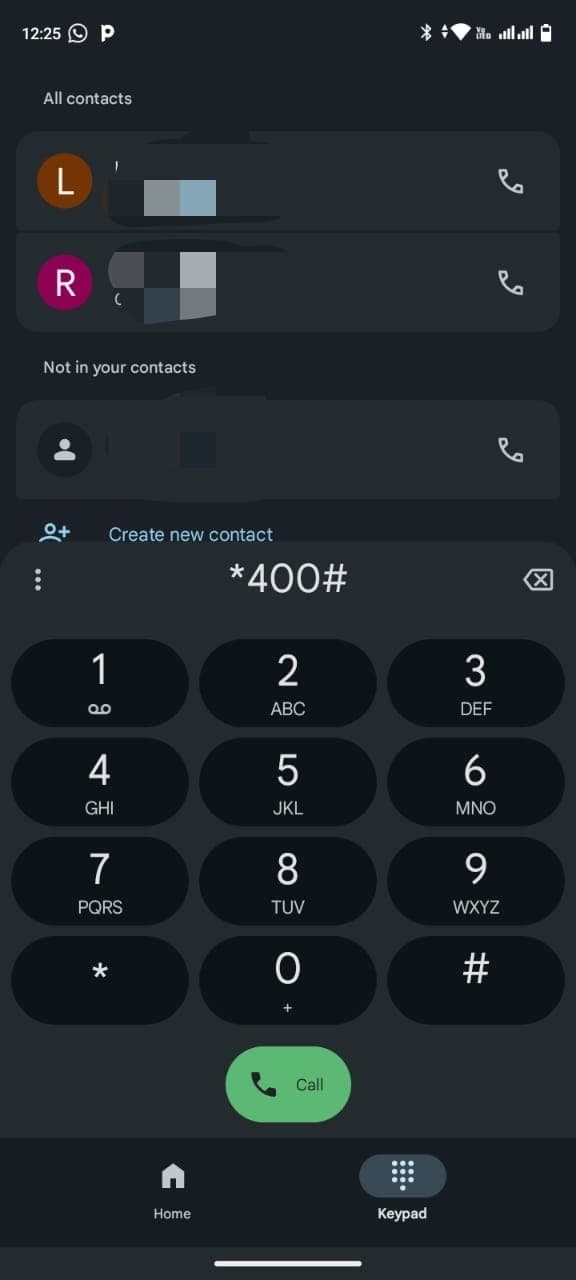
Step 1: Dial the USSD Code
Open your phone dialer and enter *400#, then press the green Call button.
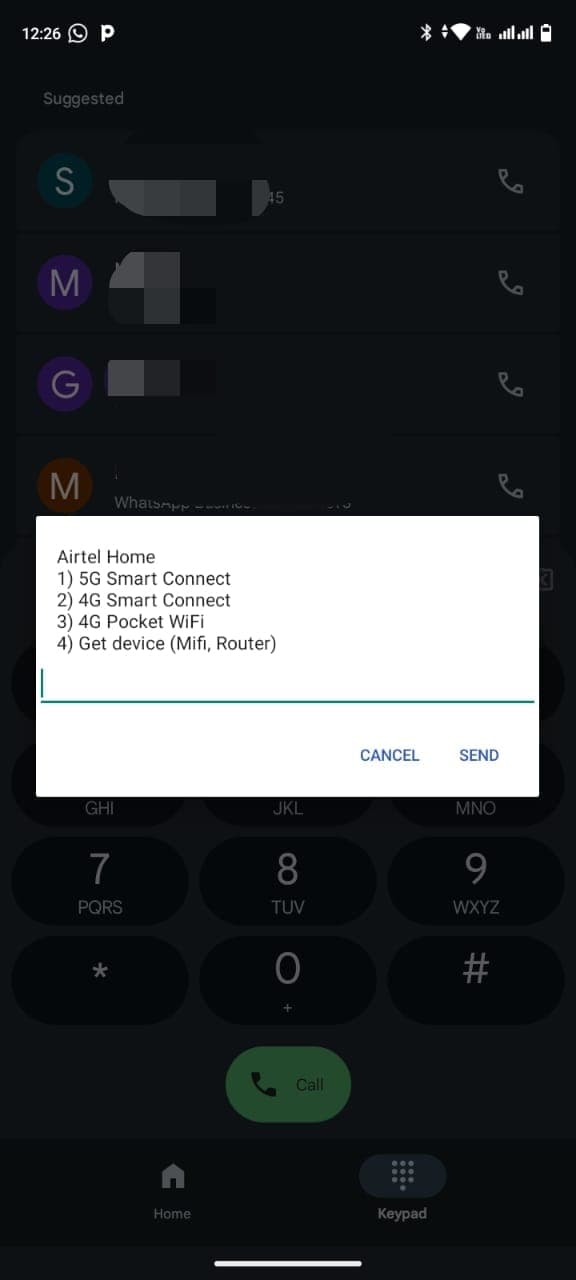
Step 2: Select 5G Smart Connect
From the Airtel Home menu, select option 1 for "5G Smart Connect".
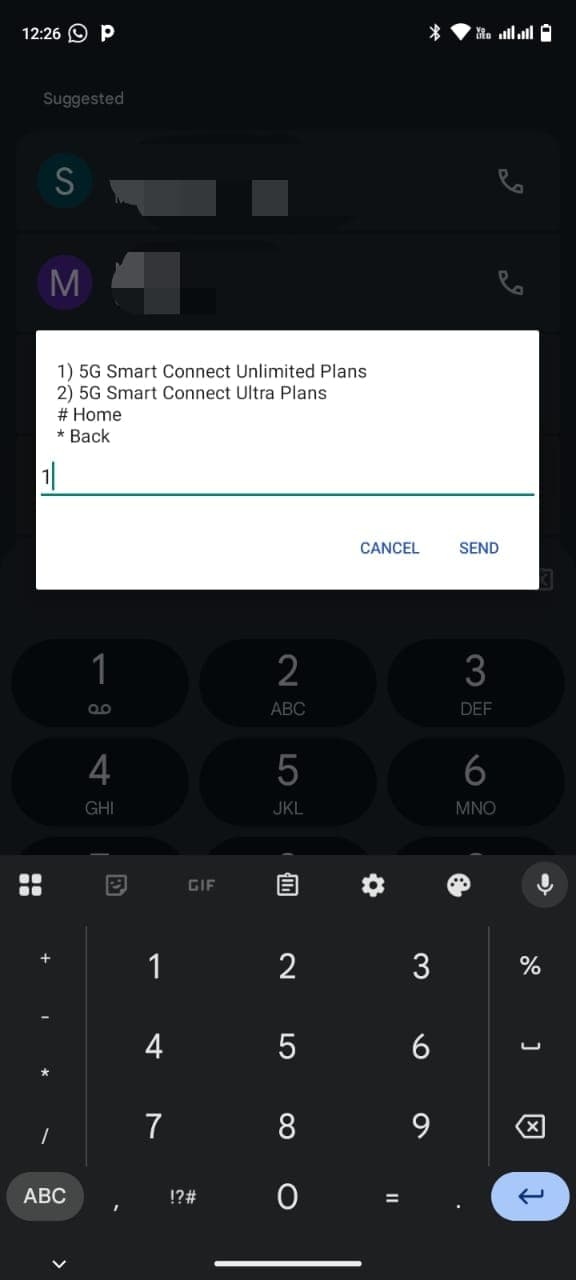
Step 3: Choose Unlimited Plans
Select option 1 for "5G Smart Connect Unlimited Plans".
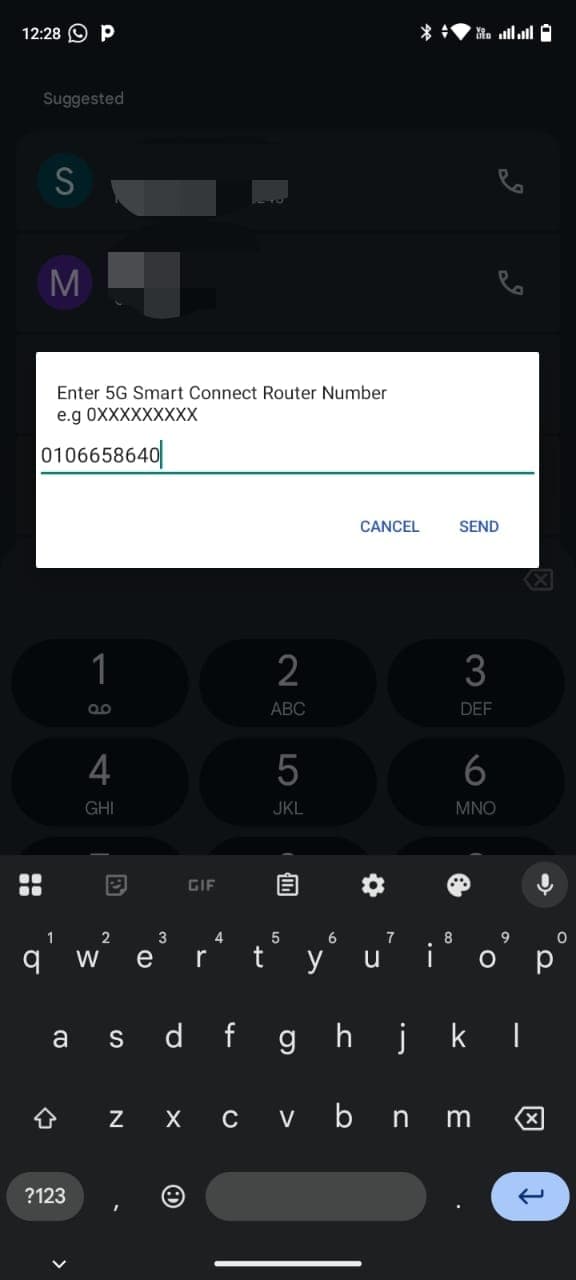
Step 4: Enter Your Router Number
Enter your 5G Smart Connect Router Number. This is the SIM card number that was inserted into your router during the first installation. The number was provided to you when the device was set up. If you can't remember it, check your Airtel SMS messages - Airtel typically sends this number in confirmation messages after installation or when your plan is active.
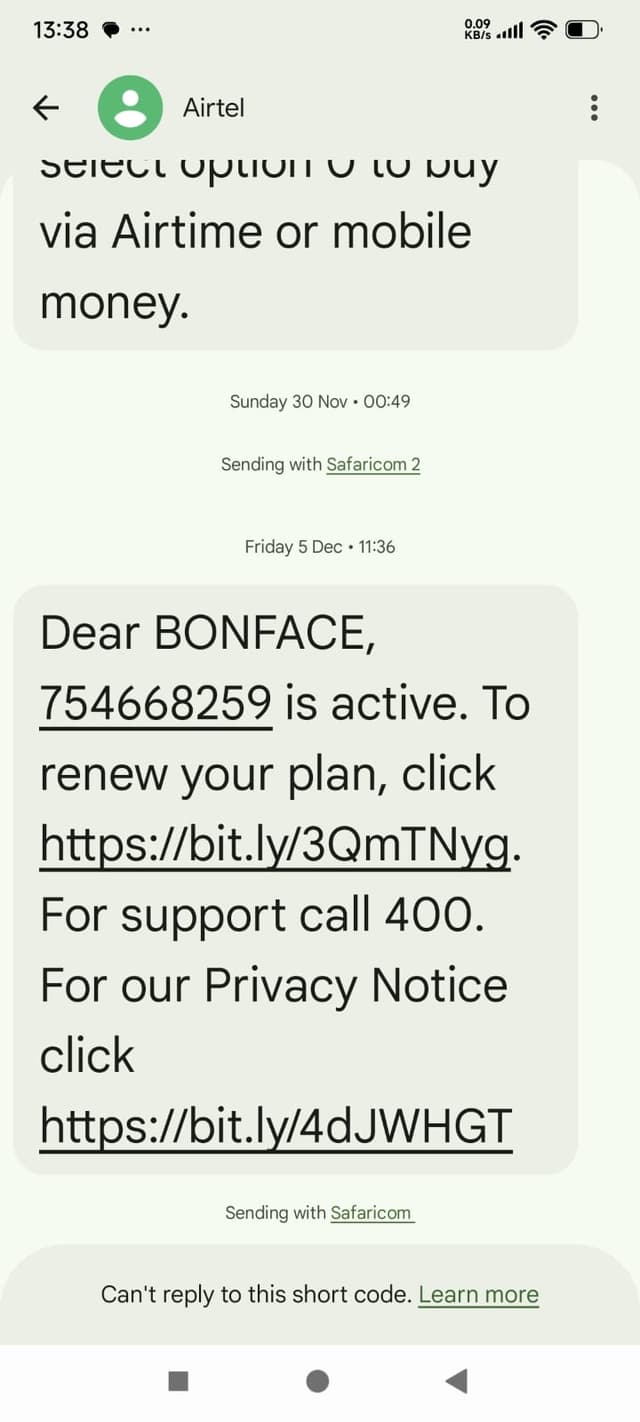
Example: Check your Airtel SMS messages to find your router number
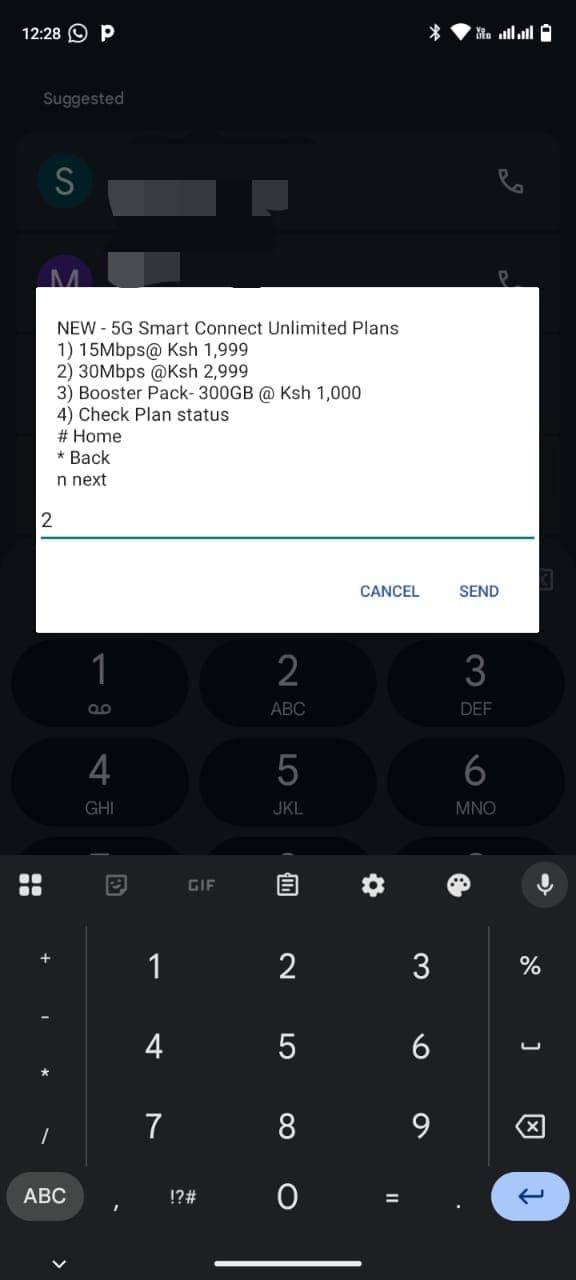
Step 5: Select Your Plan
Choose your preferred data plan:
- • Option 1: 15Mbps at 1,999 KES/month
- • Option 2: 30Mbps at 2,999 KES/month
- • Option 3: Booster Pack (300GB) at 1,000 KES
- • Option 4: Check Plan status
Step 6: Choose Payment Method
Select your preferred payment method:
- • Option 1: Airtime
- • Option 2: Airtel Money
- • Option 3: M-Pesa
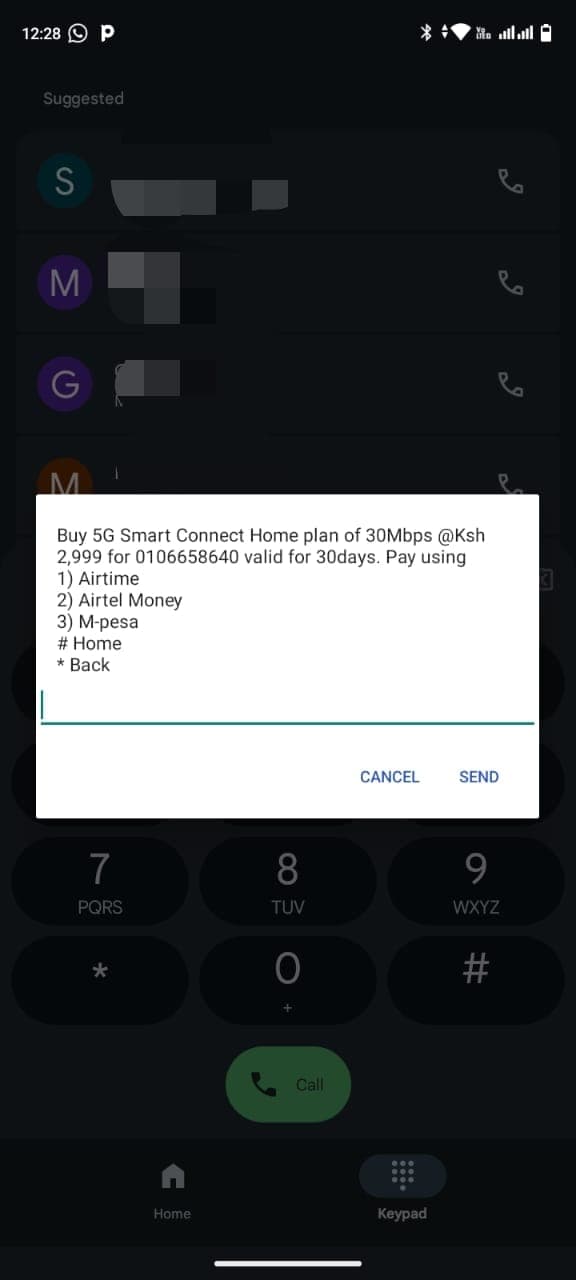
Step 7: Complete Payment (M-Pesa)
If you selected M-Pesa:
- 1. Enter your M-Pesa phone number when prompted
- 2. A payment prompt will be sent to your M-Pesa number
- 3. Enter your M-Pesa PIN to complete the payment
- 4. Your resubscription is complete!
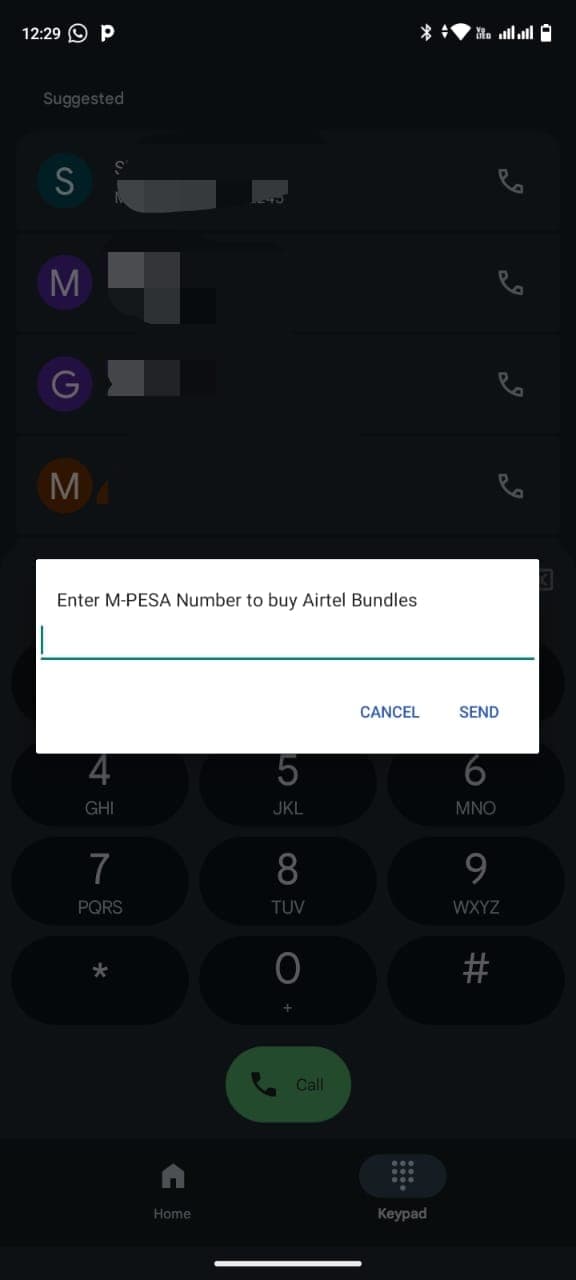
Note: Payment steps may vary slightly for Airtime and Airtel Money. Follow the on-screen prompts for your selected payment method.
Method 2: Using My Airtel App - Works Without Airtel Line
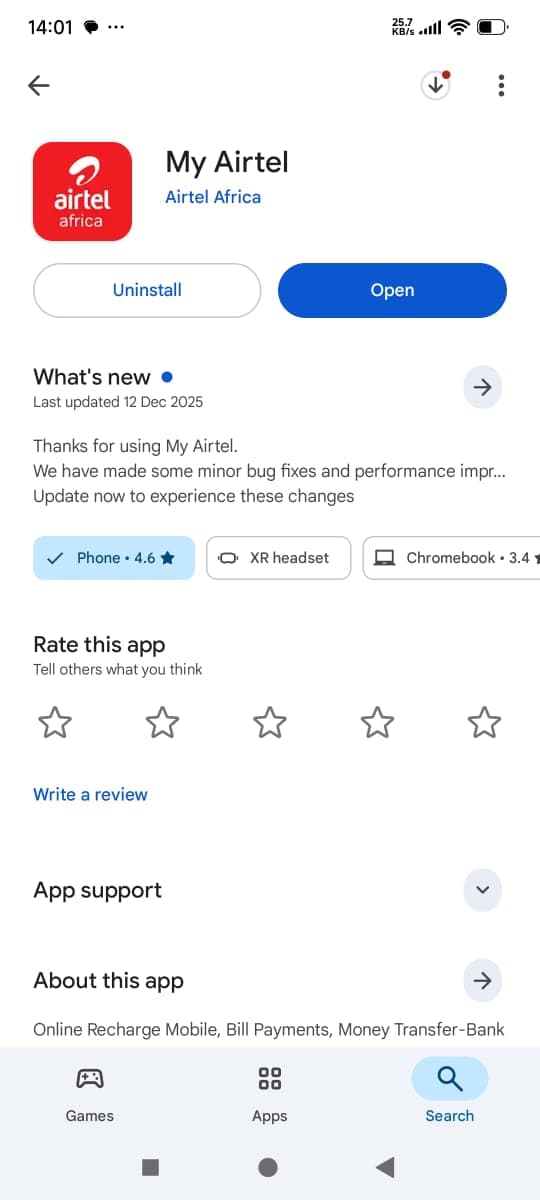
This method works on any phone - you don't need an Airtel SIM card or Airtel phone line. Perfect if you don't have an Airtel line or want to resubscribe, renew, top up, or buy data bundles from any phone. Download the app from Google Play Store.
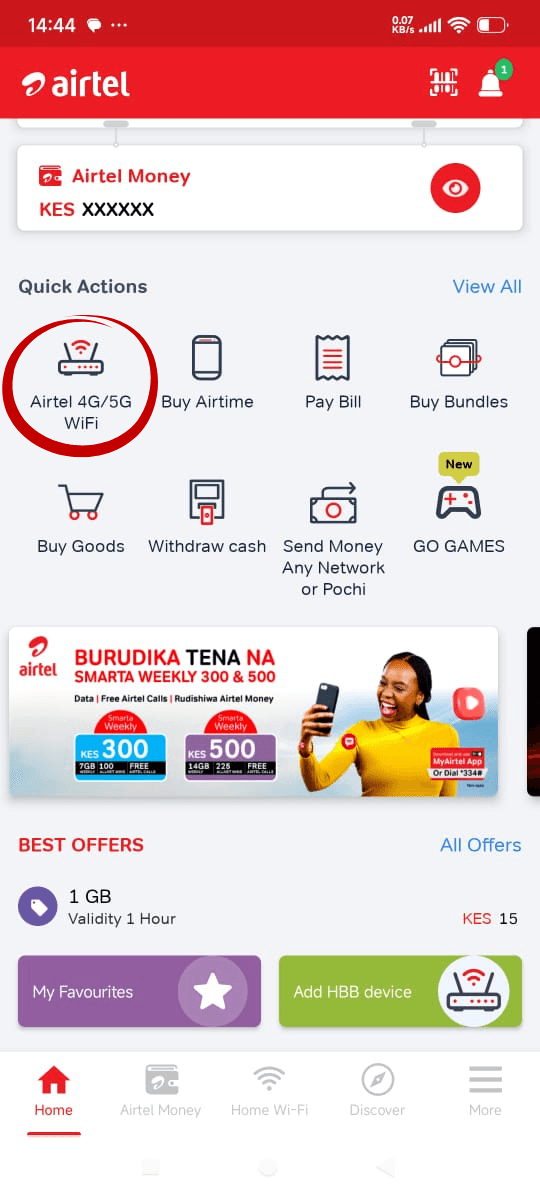
Step 2: Open Airtel 4G/5G WiFi
Open the My Airtel app and tap "Airtel 4G/5G WiFi" in the Quick Actions section on the home screen.
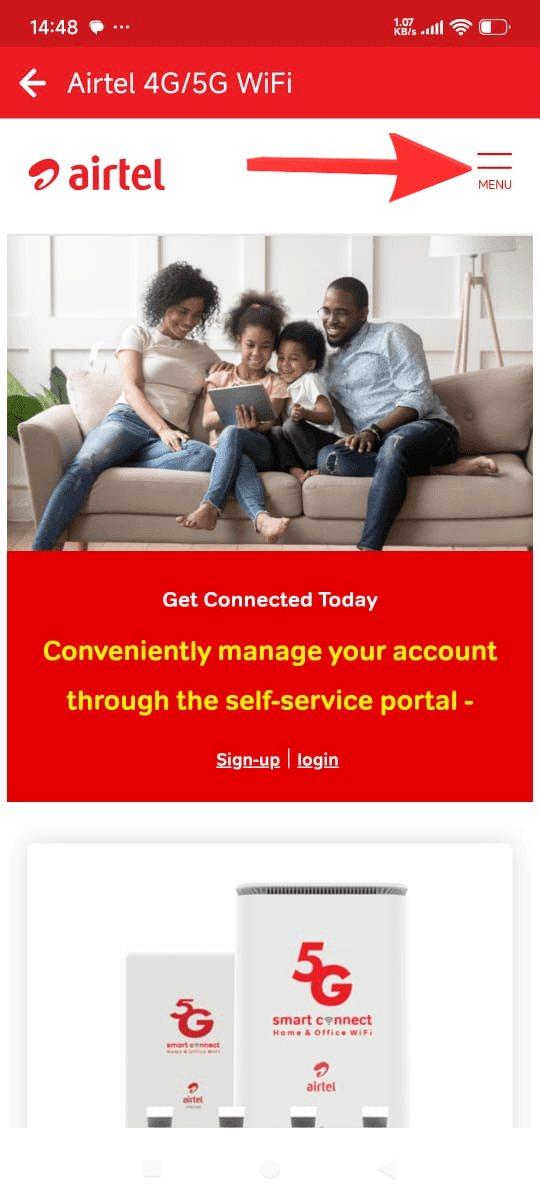
Step 3: Open Menu
Tap the MENU icon (hamburger menu) on the right side of the screen.
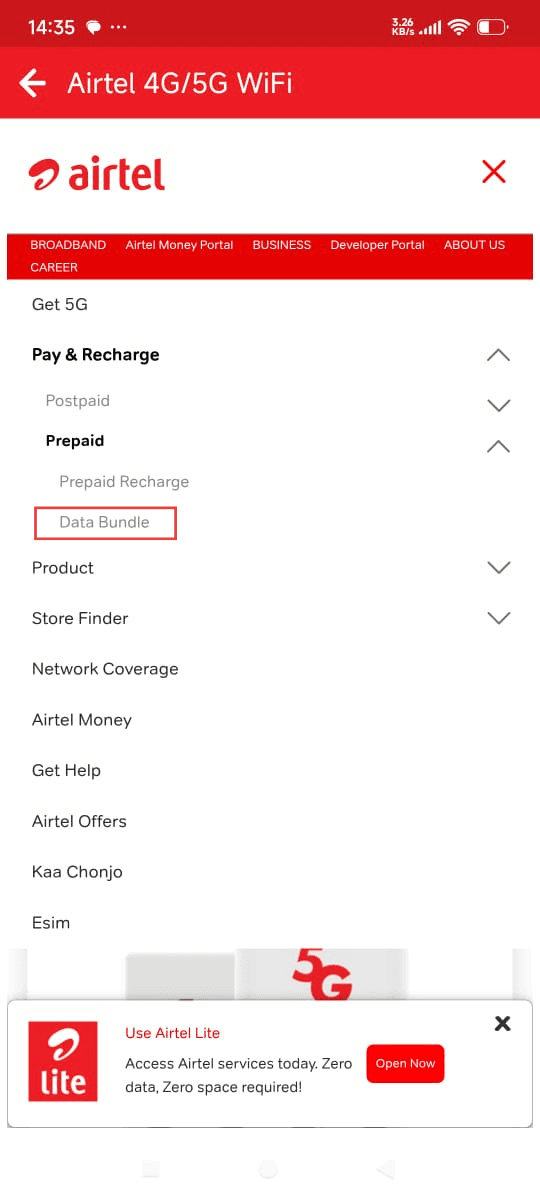
Step 4: Navigate to Data Bundle
In the menu, navigate through: Tap "Pay & Recharge" → Tap "Prepaid" → Tap "Data Bundle".
Step 5: Enter Router Number
Enter your 5G Smart Connect Router Number in the mobile number field. This is the SIM card number that was inserted into your router during the first installation. The number was provided to you when the device was set up. If you can't remember it, check your Airtel SMS messages - Airtel typically sends this number in confirmation messages after installation or when your plan is active. See Step 4 above for detailed explanation on finding your router number.
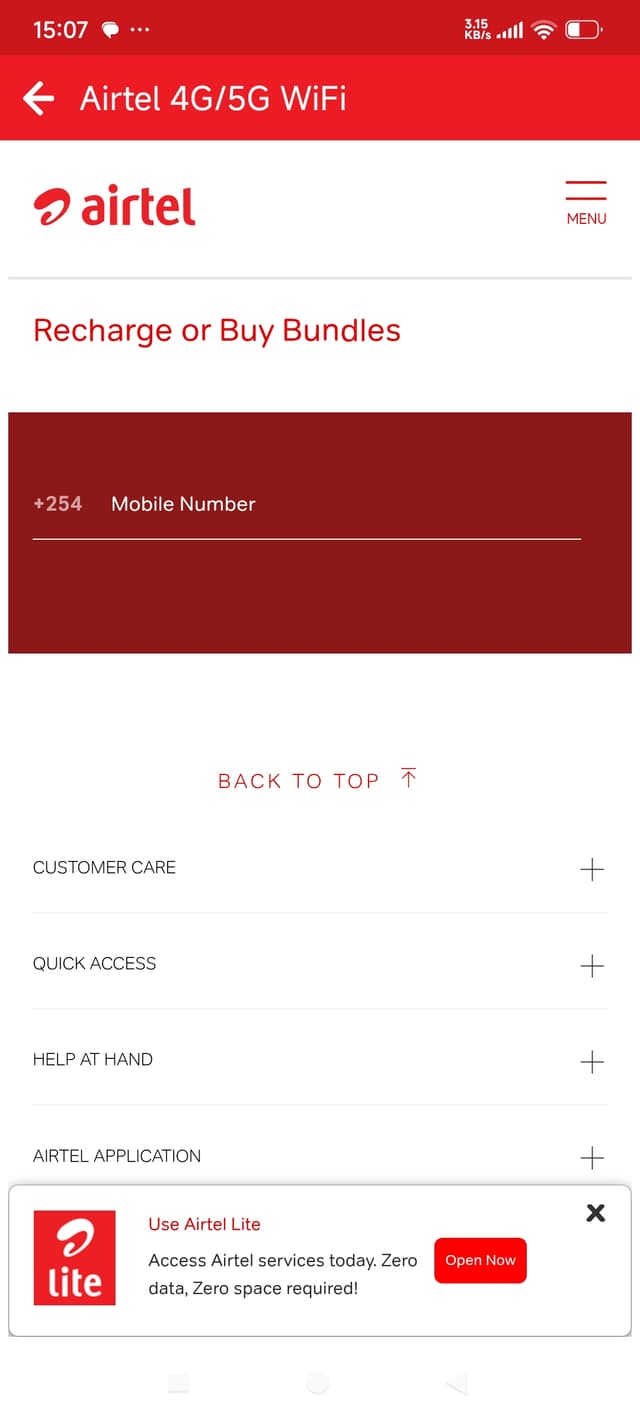
Example: Check your Airtel SMS messages to find your router number
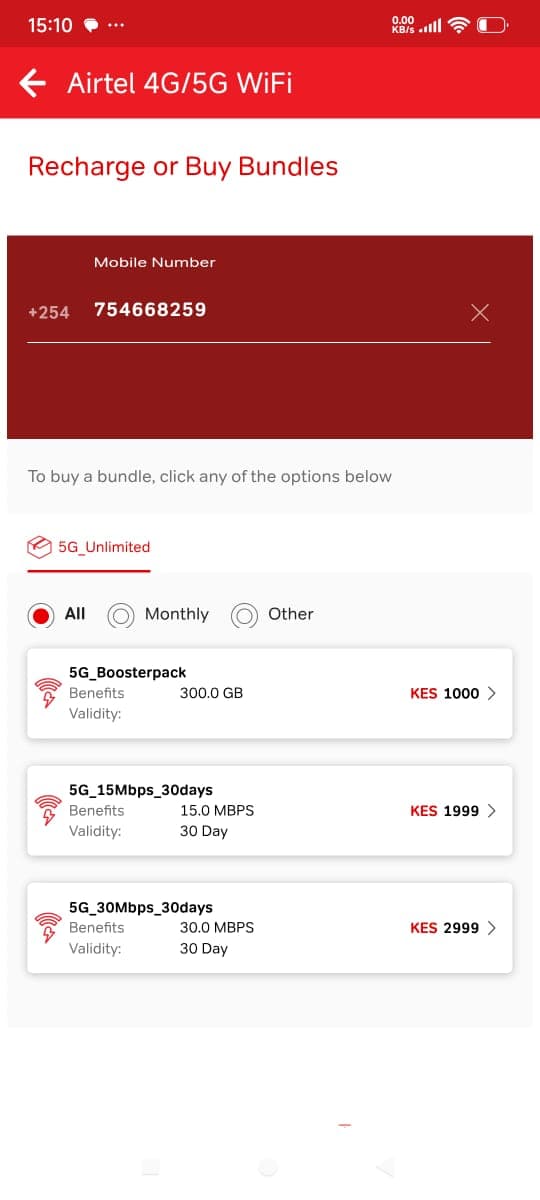
Step 6: Select Your Bundle
Choose your preferred data bundle:
- • 5G_15Mbps_30days: 15.0 MBPS, 30 Day validity - KES 1,999
- • 5G_30Mbps_30days: 30.0 MBPS, 30 Day validity - KES 2,999
- • 5G_Boosterpack: 300.0 GB - KES 1,000
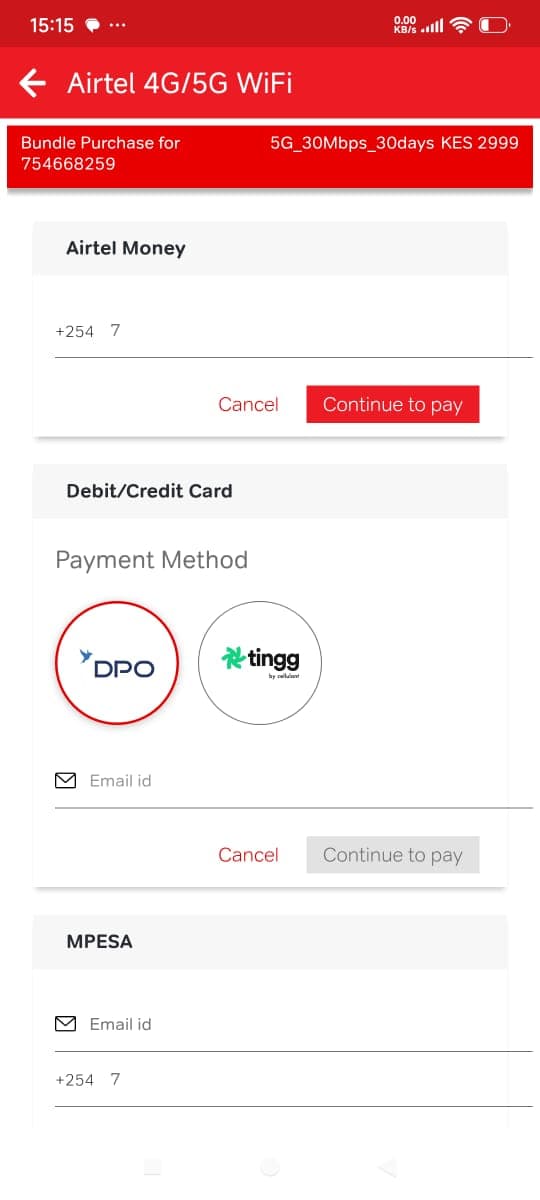
Step 7: Choose Payment Method
Select your preferred payment method:
- • Airtel Money: Enter your Airtel Money phone number
- • Debit/Credit Card: Select payment gateway and enter email
- • M-Pesa: Enter your M-Pesa phone number
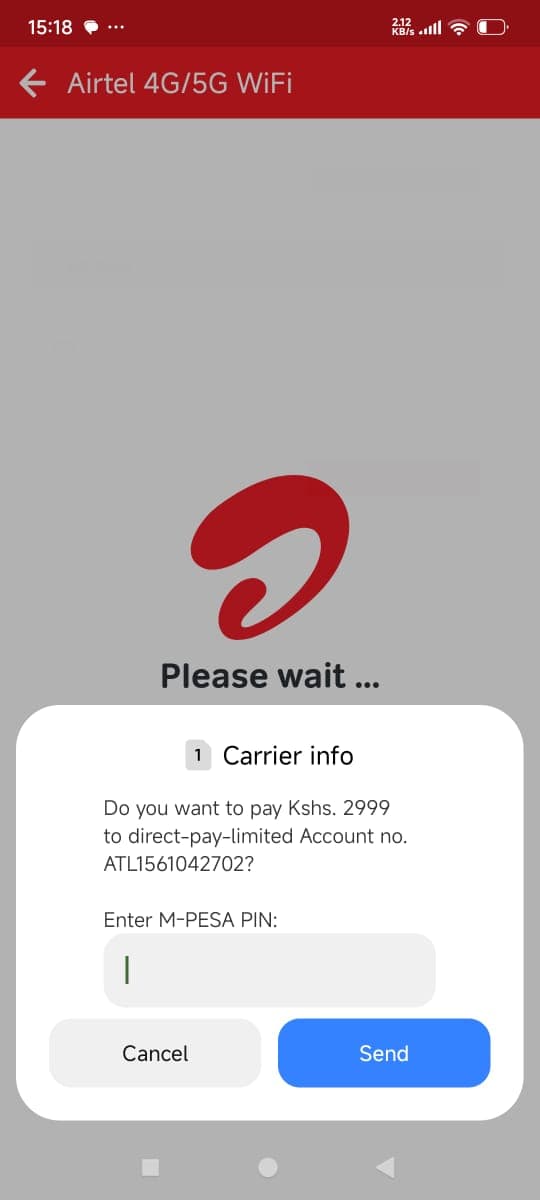
Step 8: Complete Payment (M-Pesa)
If you selected M-Pesa:
- 1. A payment confirmation dialog will appear
- 2. Enter your M-Pesa PIN when prompted
- 3. Tap "Send" to complete the payment
- 4. Your resubscription is complete!
Note: Payment steps may vary slightly for Airtel Money and Debit/Credit Card. Follow the on-screen prompts for your selected payment method.
💡 Tip: Method 1 (USSD) requires an Airtel phone line, while Method 2 (My Airtel App) works on any phone - even without an Airtel SIM card. Use Method 2 if you don't have an Airtel line. Both methods allow you to resubscribe, renew, top up, or buy new data bundles. For help or alternative methods, contact Airtel customer care at 0733 100 500 or visit our troubleshooting guide.
Where is Airtel SmartConnect available in Kenya?
Airtel SmartConnect is currently available in selected areas where Airtel has adequate network coverage.
Coverage requirement: The device needs to connect to Airtel's cellular network, so it only works in areas where Airtel has good signal strength. Availability depends on Airtel's network deployment in your specific location. Check signal strength using the LED indicators guide.
Check before ordering: It's important to check availability in your area before placing an order. You can contact us or Airtel to verify if your location has coverage. The service works best in areas with strong Airtel 5G or 4G signal. If you experience signal problems, see our signal troubleshooting guide.
Network fallback: Even if 5G isn't available in your area, the device can still work using 4G or 3G networks, as long as Airtel has coverage there. This makes it available in more areas than 5G-only services.
Compare Home & Business Internet in Kenya
Airtel SmartConnect 5G is a strong choice where Airtel coverage is good but the right ISP depends on your location, budget, and whether you need fibre, 5G, or 4G home internet. Before you request installation, it helps to see what else is available in your area.
Use Internet Kenya to compare home internet plans from Airtel, Safaricom, and other major providers in Kenya. One platform to review pricing, check availability by location, and sign up for the connection that fits you best.
Important Notes
- • Performance varies by location: Performance will vary depending on Airtel network coverage in your area
- • Network hiccups: The network may occasionally experience hiccups, which is normal for wireless services
- • Not suitable for: Areas experiencing heavy or persistent Airtel network issues
- • Reseller service: This service is provided through an authorized Airtel reseller. We assist with availability checks, installation coordination, and after-sales guidance
- • Highly recommended: For both home and office use in areas with good Airtel coverage
Get Started Today
Ready to experience reliable 5G internet? Order your Airtel SmartConnect router and get professional installation included.